// ALLOCATE & INIT DISPLAY -------------------------------------------------

/*!
    @brief  Allocate RAM for image buffer, initialize peripherals and pins.
    @param  vcs
            VCC selection. Pass SSD1306_SWITCHCAPVCC to generate the display
            voltage (step up) from the 3.3V source, or SSD1306_EXTERNALVCC
            otherwise. Most situations with Adafruit SSD1306 breakouts will
            want SSD1306_SWITCHCAPVCC.
Попробовал, и тут точно видно что дисплей повернулся на 90 град. Сдвинутый к правому углу. Это не то что нужно.
Пробовал без этого зверя. Ничего не меняется, та же растянутая картинка.
Про SSD1305, изначально хотел купить дисплей на этом контроллере, они тоже есть побольше размером, но в библиотеке отсутствует команда SSD1306_INVERSE которая используется в моём скетче. И было решено купить дисплей на SSD1309, с коим сейчас и пиздякаюсь )))
Там так
#define SSD1305_NORMALDISPLAY 0xA6
#define SSD1305_INVERTDISPLAY 0xA7
Ну и хотя бы запусти его для начала. Попробуй библиотеку от 1305, что сложного то?
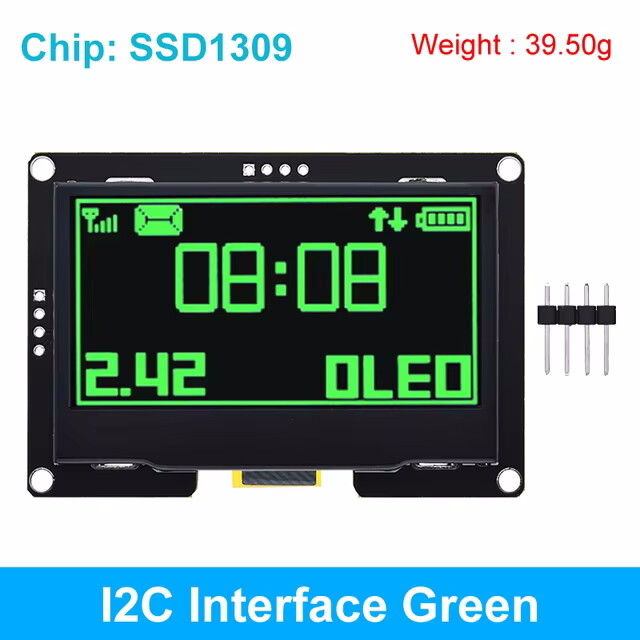
Так для начала я его запустил, смотрите пост выше. Что говорит о том что Эл. Соединения выполнены правильно, картинку он показывает правильно.
На текущий момент не корректно выводится изображение с того скетча, с которым я планирую использовать этот дисплей.
Чёй-то не сходится 
Вот тут
Так это код @Komandir
У него нет функций вывода текста/графики.
Тебе говорят - попробуй библиотеку от 1305.

По ходу запутались в 1309,1306,1305. По барабану, в скетче проекта простые, штатные функции отрисовки, цифры, линии, прямоугольники.
…тем более, что по барабану какая логика 5В или 3,3 В

Но, не по барабану наличие диодов на входе 
Ага, как у меня только не диоды, а резисторы.
А давайте ещё раз крупное/четкое фото 
@Ivan79 И вы, кстати, тоже(обратную сторону)
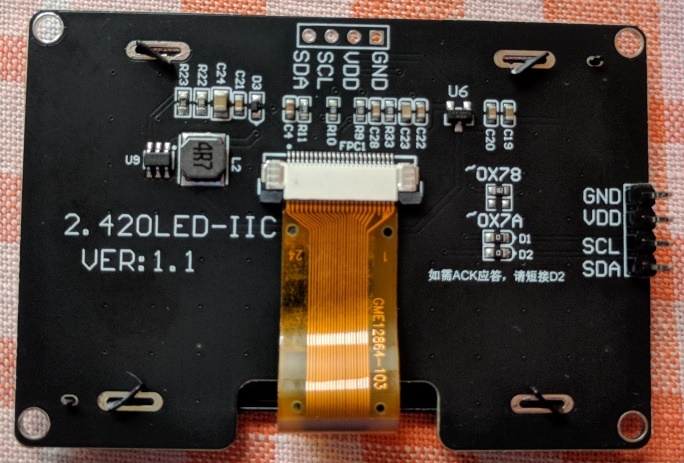
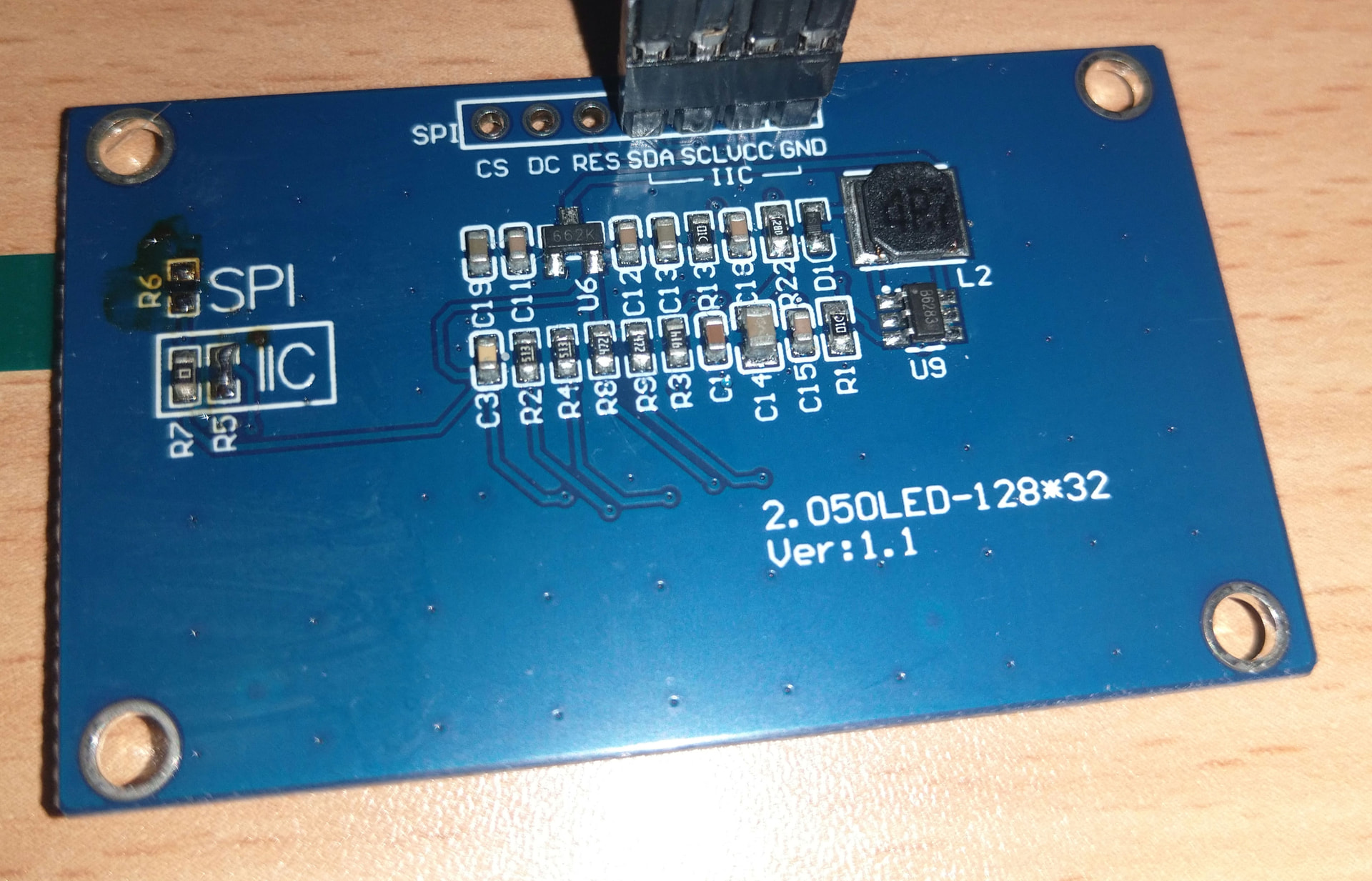
Здначицца подойдёт любая библиотека. Действуйте.
Заметно! Попробуйте перед тем как писать, сначала прочитать! А потом поместить под спойлер.
/*********************************************************************
This is a library for our Monochrome OLEDs based on SSD1305 drivers
Pick one up today in the adafruit shop!
------> https://www.adafruit.com/products/2675
These displays use SPI or I2C to communicate, 3-5 pins are required to
interface
Adafruit invests time and resources providing this open source code,
please support Adafruit and open-source hardware by purchasing
products from Adafruit!
Written by Limor Fried/Ladyada for Adafruit Industries.
BSD license, check license.txt for more information
All text above, and the splash screen below must be included in any redistribution
*********************************************************************/
#include <Wire.h>
#include <SPI.h>
#include <Adafruit_GFX.h>
#include <Adafruit_SSD1305.h>
// Used for software SPI
#define OLED_CLK 13
#define OLED_MOSI 11
// Used for software or hardware SPI
#define OLED_CS 10
#define OLED_DC 8
// Used for I2C or SPI
#define OLED_RESET 9
// software SPI
//Adafruit_SSD1305 display(128, 64, OLED_MOSI, OLED_CLK, OLED_DC, OLED_RESET, OLED_CS);
// hardware SPI - use 7Mhz (7000000UL) or lower because the screen is rated for 4MHz, or it will remain blank!
Adafruit_SSD1305 display(128, 64, &SPI, OLED_DC, OLED_RESET, OLED_CS, 7000000UL);
// I2C
//Adafruit_SSD1305 display(128, 64, &Wire, OLED_RESET);
#define NUMFLAKES 10
#define XPOS 0
#define YPOS 1
#define DELTAY 2
#define LOGO16_GLCD_HEIGHT 16
#define LOGO16_GLCD_WIDTH 16
static const unsigned char PROGMEM logo16_glcd_bmp =
{ B00000000, B11000000,
B00000001, B11000000,
B00000001, B11000000,
B00000011, B11100000,
B11110011, B11100000,
B11111110, B11111000,
B01111110, B11111111,
B00110011, B10011111,
B00011111, B11111100,
B00001101, B01110000,
B00011011, B10100000,
B00111111, B11100000,
B00111111, B11110000,
B01111100, B11110000,
B01110000, B01110000,
B00000000, B00110000 };
void setup() {
Serial.begin(9600);
while (! Serial) delay(100);
Serial.println(“SSD1305 OLED test”);
if ( ! display.begin(0x3C) ) {
 Serial.println("Unable to initialize OLED");

 while (1) yield();
}
// init done
display.display(); // show splashscreen
delay(1000);
display.clearDisplay(); // clears the screen and buffer
// draw a single pixel
display.drawPixel(10, 10, WHITE);
display.display();
delay(1000);
display.clearDisplay();
// draw many lines
testdrawline();
display.display();
delay(1000);
display.clearDisplay();
// draw rectangles
testdrawrect();
display.display();
delay(1000);
display.clearDisplay();
// draw multiple rectangles
testfillrect();
display.display();
delay(1000);
display.clearDisplay();
// draw mulitple circles
testdrawcircle();
display.display();
delay(1000);
display.clearDisplay();
// draw a white circle, 10 pixel radius
display.fillCircle(display.width()/2, display.height()/2, 10, WHITE);
display.display();
delay(1000);
display.clearDisplay();
testdrawroundrect();
delay(1000);
display.clearDisplay();
testfillroundrect();
delay(1000);
display.clearDisplay();
testdrawtriangle();
delay(1000);
display.clearDisplay();
testfilltriangle();
delay(1000);
display.clearDisplay();
// draw the first ~12 characters in the font
testdrawchar();
display.display();
delay(1000);
display.clearDisplay();
for (uint8_t rot=0; rot < 4; rot++) {
display.setRotation(rot);

display.clearDisplay();

// text display tests

display.setTextSize(1);

display.setTextColor(WHITE);

display.setCursor(0,0);

display.println("Hello, world!");

display.setTextColor(BLACK, WHITE); // 'inverted' text

display.println(3.141592);

display.setTextSize(2);

display.setTextColor(WHITE);

display.print("0x"); display.println(0xDEADBEEF, HEX);

display.display();

delay(1000);
}
display.setRotation(0);
// miniature bitmap display
display.clearDisplay();
display.drawBitmap(30, 16, logo16_glcd_bmp, 16, 16, 1);
display.display();
// invert the display
display.invertDisplay(true);
delay(1000);
display.invertDisplay(false);
delay(1000);
// draw a bitmap icon and ‘animate’ movement
testdrawbitmap(logo16_glcd_bmp, LOGO16_GLCD_HEIGHT, LOGO16_GLCD_WIDTH);
}
void loop() {
}
void testdrawbitmap(const uint8_t *bitmap, uint8_t w, uint8_t h) {
uint8_t icons[NUMFLAKES][3];
randomSeed(666); // whatever seed
// initialize
for (uint8_t f=0; f< NUMFLAKES; f++) {
icons\[f\]\[XPOS\] = random(display.width());

icons\[f\]\[YPOS\] = 0;

icons\[f\]\[DELTAY\] = random(5) + 1;


Serial.print("x: ");

Serial.print(icons\[f\]\[XPOS\], DEC);

Serial.print(" y: ");

Serial.print(icons\[f\]\[YPOS\], DEC);

Serial.print(" dy: ");

Serial.println(icons\[f\]\[DELTAY\], DEC);
}
while (1) {
// draw each icon

for (uint8_t f=0; f< NUMFLAKES; f++) {

  display.drawBitmap(icons\[f\]\[XPOS\], icons\[f\]\[YPOS\], logo16_glcd_bmp, w, h, WHITE);

}

display.display();

delay(200);


// then erase it + move it

for (uint8_t f=0; f< NUMFLAKES; f++) {

  display.drawBitmap(icons\[f\]\[XPOS\], icons\[f\]\[YPOS\],  logo16_glcd_bmp, w, h, BLACK);

  // move it

  icons\[f\]\[YPOS\] += icons\[f\]\[DELTAY\];

  // if its gone, reinit

  if (icons\[f\]\[YPOS\] > display.height()) {
icons[f][XPOS] = random(display.width());
icons[f][YPOS] = 0;
icons[f][DELTAY] = random(5) + 1;
  }

}
}
}
void testdrawchar(void) {
display.setTextSize(1);
display.setTextWrap(false);
display.setTextColor(WHITE);
display.setCursor(0,0);
for (uint8_t i=0; i < 168; i++) {
if (i == '\\n') continue;

display.write(i);

if ((i > 0) && (i % 21 == 0))

  display.println();
}
display.display();
}
void testdrawcircle(void) {
for (uint8_t i=0; i<display.height(); i+=2) {
display.drawCircle(display.width()/2, display.height()/2, i, WHITE);

display.display();
}
}
void testfillrect(void) {
uint8_t color = 1;
for (uint8_t i=0; i<display.height()/2; i+=3) {
// alternate colors

display.fillRect(i, i, display.width()-i\*2, display.height()-i\*2, color%2);

display.display();

color++;
}
}
void testdrawtriangle(void) {
for (uint16_t i=0; i<min(display.width(),display.height())/2; i+=5) {
display.drawTriangle(display.width()/2, display.height()/2-i,

                 display.width()/2-i, display.height()/2+i,

                 display.width()/2+i, display.height()/2+i, WHITE);

display.display();
}
}
void testfilltriangle(void) {
uint8_t color = WHITE;
for (int16_t i=min(display.width(),display.height())/2; i>0; i-=5) {
display.fillTriangle(display.width()/2, display.height()/2-i,

                 display.width()/2-i, display.height()/2+i,

                 display.width()/2+i, display.height()/2+i, WHITE);

if (color == WHITE) color = BLACK;

else color = WHITE;

display.display();
}
}
void testdrawroundrect(void) {
for (uint8_t i=0; i<display.height()/3-2; i+=2) {
display.drawRoundRect(i, i, display.width()-2\*i, display.height()-2\*i, display.height()/4, WHITE);

display.display();
}
}
void testfillroundrect(void) {
uint8_t color = WHITE;
for (uint8_t i=0; i<display.height()/3-2; i+=2) {
display.fillRoundRect(i, i, display.width()-2\*i, display.height()-2\*i, display.height()/4, color);

if (color == WHITE) color = BLACK;

else color = WHITE;

display.display();
}
}
void testdrawrect(void) {
for (uint8_t i=0; i<display.height()/2; i+=2) {
display.drawRect(i, i, display.width()-2\*i, display.height()-2\*i, WHITE);

display.display();
}
}
void testdrawline() {
for (uint8_t i=0; i<display.width(); i+=4) {
display.drawLine(0, 0, i, display.height()-1, WHITE);

display.display();
}
for (uint8_t i=0; i<display.height(); i+=4) {
display.drawLine(0, 0, display.width()-1, i, WHITE);

display.display();
}
delay(250);
display.clearDisplay();
for (uint8_t i=0; i<display.width(); i+=4) {
display.drawLine(0, display.height()-1, i, 0, WHITE);

display.display();
}
for (int8_t i=display.height()-1; i>=0; i-=4) {
display.drawLine(0, display.height()-1, display.width()-1, i, WHITE);

display.display();
}
delay(250);
display.clearDisplay();
for (int8_t i=display.width()-1; i>=0; i-=4) {
display.drawLine(display.width()-1, display.height()-1, i, 0, WHITE);

display.display();
}
for (int8_t i=display.height()-1; i>=0; i-=4) {
display.drawLine(display.width()-1, display.height()-1, 0, i, WHITE);

display.display();
}
delay(250);
display.clearDisplay();
for (uint8_t i=0; i<display.height(); i+=4) {
display.drawLine(display.width()-1, 0, 0, i, WHITE);

display.display();
}
for (uint8_t i=0; i<display.width(); i+=4) {
display.drawLine(display.width()-1, 0, i, display.height()-1, WHITE);

display.display();
}
delay(250);
}
Убрал под спойлер