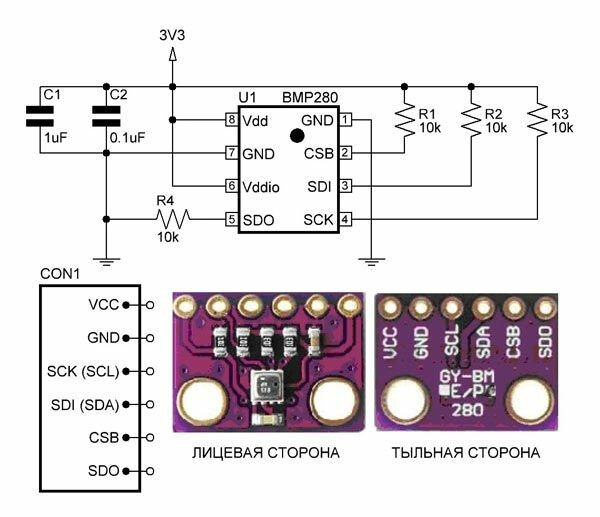
опять очередная проблема. датчик bmp280 показывает отрицательную, далеко отрицательную за -100 и маленькое давление
сканеров нашел что датчик находиться на 0x76
void setup()
{
Wire.begin();

Serial.begin(115200);
while (!Serial);             // Leonardo: wait for serial monitor
Serial.println(“\nI2C Scanner”);
}

void loop()
{
byte error, address;
int nDevices;

Serial.println(“Scanning…”);

nDevices = 0;
for(address = 1; address < 127; address++ )
{
// The i2c_scanner uses the return value of
// the Write.endTransmisstion to see if
// a device did acknowledge to the address.
Wire.beginTransmission(address);
error = Wire.endTransmission();

if (error == 0)
{
  Serial.print("I2C device found at address 0x");
  if (address<16)
    Serial.print("0");
  Serial.print(address,HEX);
  Serial.println("  !");

  nDevices++;
}
else if (error==4)
{
  Serial.print("Unknown error at address 0x");
  if (address<16)
    Serial.print("0");
  Serial.println(address,HEX);
}

}
if (nDevices == 0)
Serial.println(“No I2C devices found\n”);
else
Serial.println(“done\n”);

delay(5000);           // wait 5 seconds for next scan
}
использую скетч из примера
/***************************************************************************
This is a library for the BMP280 humidity, temperature & pressure sensor

Designed specifically to work with the Adafruit BMP280 Breakout
----> http://www.adafruit.com/products/2651

These sensors use I2C or SPI to communicate, 2 or 4 pins are required
to interface.

Adafruit invests time and resources providing this open source code,
please support Adafruit andopen-source hardware by purchasing products
from Adafruit!

Written by Limor Fried & Kevin Townsend for Adafruit Industries.
BSD license, all text above must be included in any redistribution
***************************************************************************/

#include <Adafruit_BMP280.h>

//#define BMP_SCK  (13)
//#define BMP_MISO (12)
//#define BMP_MOSI (11)
//#define BMP_CS   (10)

Adafruit_BMP280 bmp; // I2C
//Adafruit_BMP280 bmp(BMP_CS); // hardware SPI
//Adafruit_BMP280 bmp(BMP_CS, BMP_MOSI, BMP_MISO,  BMP_SCK);

void setup() {
Serial.begin(115200);
Serial.println(F(“BMP280 Forced Mode Test.”));

!bmp.begin(BMP280_ADDRESS_ALT, BMP280_CHIPID);

/* Default settings from datasheet. /
bmp.setSampling(Adafruit_BMP280::MODE_FORCED,     / Operating Mode. /
Adafruit_BMP280::SAMPLING_X2,     / Temp. oversampling /
Adafruit_BMP280::SAMPLING_X16,    / Pressure oversampling /
Adafruit_BMP280::FILTER_X16,      / Filtering. /
Adafruit_BMP280::STANDBY_MS_500); / Standby time. */
}

void loop() {
// must call this to wake sensor up and get new measurement data
// it blocks until measurement is complete
bmp.takeForcedMeasurement();
// can now print out the new measurements
Serial.print(F(“Temperature = “));
Serial.print(bmp.readTemperature());
Serial.println(” *C”);

Serial.print(F("Pressure = "));
Serial.print(bmp.readPressure());
Serial.println(" Pa");

Serial.print(F("Approx altitude = "));
Serial.print(bmp.readAltitude(1013.25)); /* Adjusted to local forecast! */
Serial.println(" m");

Serial.println();
delay(2000);

}
/***************************************************************************
  This is a library for the BMP280 humidity, temperature & pressure sensor

  Designed specifically to work with the Adafruit BMP280 Breakout
  ----> http://www.adafruit.com/products/2651

  These sensors use I2C or SPI to communicate, 2 or 4 pins are required
  to interface.

  Adafruit invests time and resources providing this open source code,
  please support Adafruit andopen-source hardware by purchasing products
  from Adafruit!

  Written by Limor Fried & Kevin Townsend for Adafruit Industries.
  MIT license, see LICENSE.txt for more information
 ***************************************************************************/

#include <Wire.h>
#include <SPI.h>
#include <Adafruit_BMP280.h>

#define BMP_SCK  (13)
#define BMP_MISO (12)
#define BMP_MOSI (11)
#define BMP_CS   (10)

Adafruit_BMP280 bmp; // I2C
//Adafruit_BMP280 bmp(BMP_CS); // hardware SPI
//Adafruit_BMP280 bmp(BMP_CS, BMP_MOSI, BMP_MISO,  BMP_SCK);

void setup() {
  Serial.begin(9600);
  while ( !Serial ) delay(100);   // wait for native usb
  Serial.println(F("BMP280 test"));
  unsigned status;
  //status = bmp.begin(BMP280_ADDRESS_ALT, BMP280_CHIPID);
  status = bmp.begin();
  if (!status) {
    Serial.println(F("Could not find a valid BMP280 sensor, check wiring or "
                      "try a different address!"));
    Serial.print("SensorID was: 0x"); Serial.println(bmp.sensorID(),16);
    Serial.print("        ID of 0xFF probably means a bad address, a BMP 180 or BMP 085\n");
    Serial.print("   ID of 0x56-0x58 represents a BMP 280,\n");
    Serial.print("        ID of 0x60 represents a BME 280.\n");
    Serial.print("        ID of 0x61 represents a BME 680.\n");
    while (1) delay(10);
  }

  /* Default settings from datasheet. */
  bmp.setSampling(Adafruit_BMP280::MODE_NORMAL,     /* Operating Mode. */
                  Adafruit_BMP280::SAMPLING_X2,     /* Temp. oversampling */
                  Adafruit_BMP280::SAMPLING_X16,    /* Pressure oversampling */
                  Adafruit_BMP280::FILTER_X16,      /* Filtering. */
                  Adafruit_BMP280::STANDBY_MS_500); /* Standby time. */
}

void loop() {
    Serial.print(F("Temperature = "));
    Serial.print(bmp.readTemperature());
    Serial.println(" *C");

    Serial.print(F("Pressure = "));
    Serial.print(bmp.readPressure());
    Serial.println(" Pa");

    Serial.print(F("Approx altitude = "));
    Serial.print(bmp.readAltitude(1013.25)); /* Adjusted to local forecast! */
    Serial.println(" m");

    Serial.println();
    delay(2000);
}
за чем так сразу? у меня нет опыта программирования, мне нужно только проверить работоспособность датчика. Есть какой то другой способ подскажите что бы флудом не заниматься.
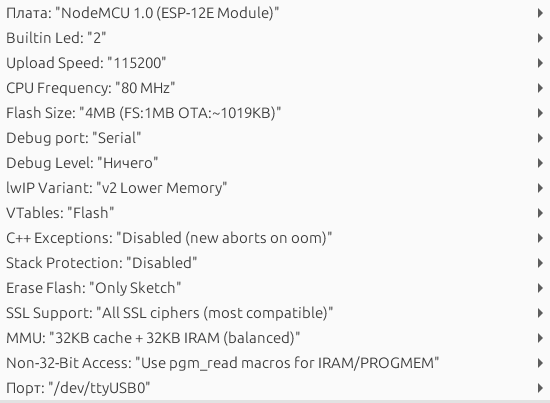
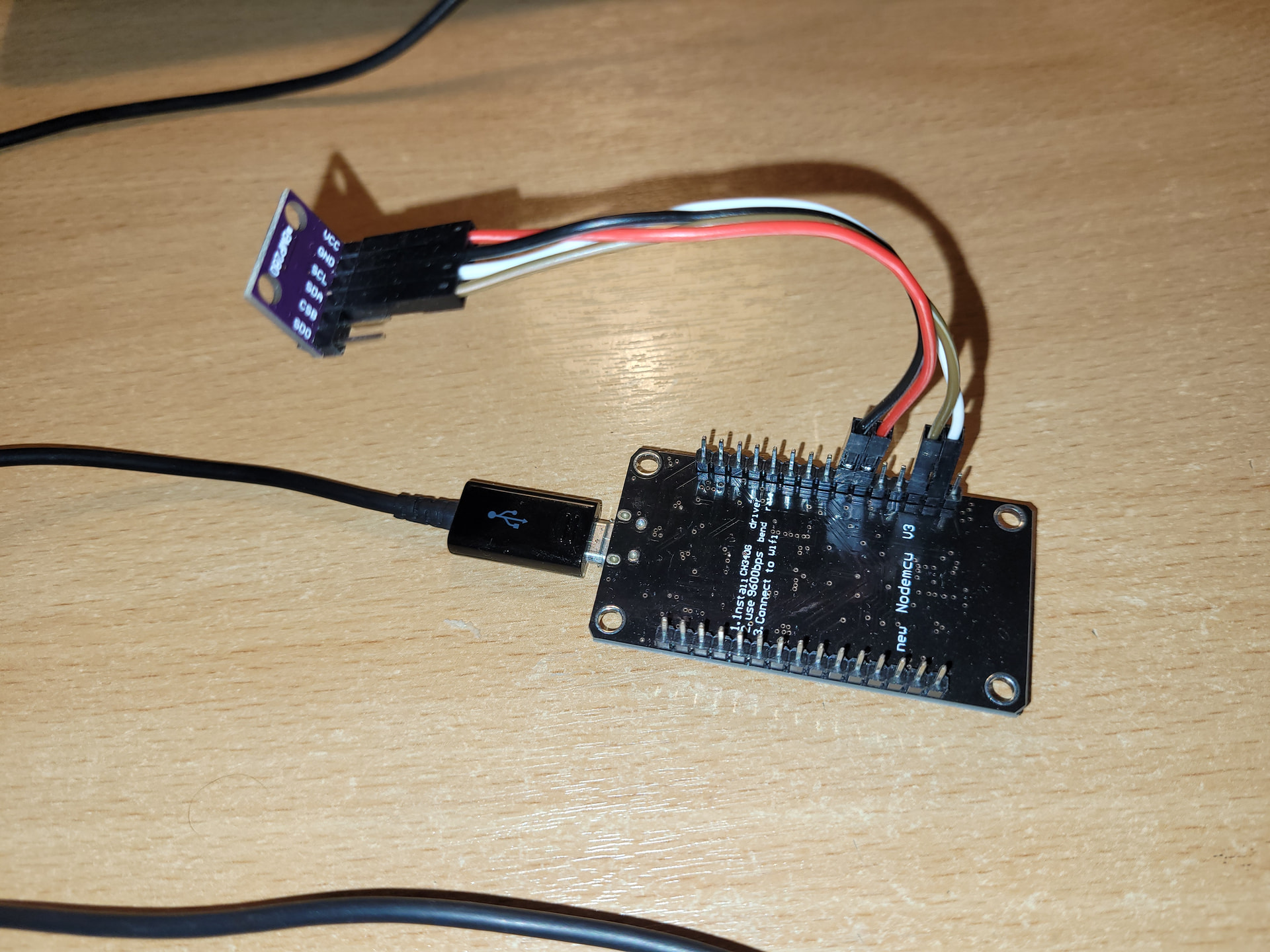
Есть! И вполне логичный. Предоставить все данные по проблеме. Выложить именно Ваш скетч, а не первый попавшийся из интернета (тестовый вы так-же выложили с дикими ошибками и он даже не компилируется), указать IDE в которой работаете, версию аддона, что за плата и какие настройки, откуда библиотеки. Ссылки на модули и схему сборки. Желательно и фото сборки. Имхо: иметь сборку и минимальное оборудование под рукой ибо народ для помощи вам даже в даташит лезет, время своё тратит, пальцы в кровь о клаву сбивает ,а вам и проверить советы то не на чем.
А так припаяйте провода вместо втыкивания дюпонов и почти наверняка всё наладится
/***************************************************************************
This is a library for the BMP280 humidity, temperature & pressure sensor

Designed specifically to work with the Adafruit BMP280 Breakout
----> http://www.adafruit.com/products/2651

These sensors use I2C or SPI to communicate, 2 or 4 pins are required
to interface.

Adafruit invests time and resources providing this open source code,
please support Adafruit andopen-source hardware by purchasing products
from Adafruit!

Written by Limor Fried & Kevin Townsend for Adafruit Industries.
MIT license, see LICENSE.txt for more information
***************************************************************************/

#include <Wire.h>
#include <SPI.h>
#include <Adafruit_BMP280.h>

#define BMP_SCK  (13)
#define BMP_MISO (12)
#define BMP_MOSI (11)
#define BMP_CS   (10)

Adafruit_BMP280 bmp; // I2C
//Adafruit_BMP280 bmp(BMP_CS); // hardware SPI
//Adafruit_BMP280 bmp(BMP_CS, BMP_MOSI, BMP_MISO,  BMP_SCK);

void setup() {
Serial.begin(115200);
while ( !Serial ) delay(100);   // wait for native usb
Serial.println(F(“BMP280 test”));
unsigned status;
//status = bmp.begin(BMP280_ADDRESS_ALT, BMP280_CHIPID);
status = bmp.begin(0x76);
if (!status) {
Serial.println(F(“Could not find a valid BMP280 sensor, check wiring or "
“try a different address!”));
Serial.print(“SensorID was: 0x”); Serial.println(bmp.sensorID(),16);
Serial.print(”        ID of 0xFF probably means a bad address, a BMP 180 or BMP 085\n");
Serial.print("   ID of 0x56-0x58 represents a BMP 280,\n");
Serial.print("        ID of 0x60 represents a BME 280.\n");
Serial.print("        ID of 0x61 represents a BME 680.\n");
while (1) delay(10);
}

/* Default settings from datasheet. /
bmp.setSampling(Adafruit_BMP280::MODE_NORMAL,     / Operating Mode. /
Adafruit_BMP280::SAMPLING_X2,     / Temp. oversampling /
Adafruit_BMP280::SAMPLING_X16,    / Pressure oversampling /
Adafruit_BMP280::FILTER_X16,      / Filtering. /
Adafruit_BMP280::STANDBY_MS_500); / Standby time. */
}

void loop() {
Serial.print(F(“Temperature = “));
Serial.print(bmp.readTemperature());
Serial.println(” *C”);

Serial.print(F("Pressure = "));
Serial.print(bmp.readPressure()*0.00750062);  /*1Ра = 0,00750062 мм. рт. ст.*/
Serial.println(" мм. рт. ст.");

Serial.print(F("Approx altitude = "));
Serial.print(bmp.readAltitude(1012)); /* Adjusted to local forecast! */
Serial.println(" m");

Serial.println();
delay(2000);

}
типа это строчка отвечает за это ? наверное по i2c подключает тогда… и я ошибся… ну конфликт библиотек все равно может наверное быть))) и лучше закомментировать… //#include <SPI.h>